Sticky Notes: Simplify Your Reminder Process
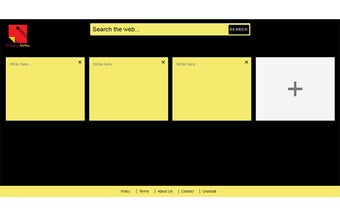
Sticky Notes is a free Chrome extension developed by stickynotes228. This add-on falls under the category of Browsers and specifically the subcategory of Add-ons & Tools. With Sticky Notes, users can easily add and organize quick reminders directly from their new tab. This convenient tool aims to help users stay organized and productive by ensuring that important information doesn't slip through the cracks.
By installing the Sticky Notes extension, users can jot down important information and access it with ease. The extension also offers the option to set Chrome New Tab search provider to Microsoft Bing. However, it's important to note that by clicking "Add to Chrome", users are accepting the terms of use and privacy policy as described by the service.
To uninstall Sticky Notes from Google Chrome, users can follow simple steps. They need to click on the three horizontal lines icon in the upper right-hand corner of the Chrome browser, go to "Settings", click on "Extensions" in the menu, find the name of the toolbar extension in the list of installed extensions, click on the trash can icon next to "Enable", and finally, close and reopen the browser.
Please note that for further information about uninstallation, the EULA/Terms of Use, and the Privacy Policy, users can refer to the provided links.